Razer Soma Pro price: $999.99 for a gaming chair you can feel, hear and see
Six vibration motors in the seat and back, speakers in the headrest, and a USB-C cable that can run off a power bank. What the two new chairs do, and what you still have to buy.
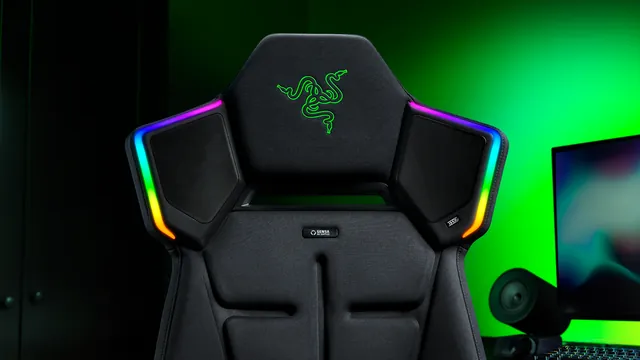
Razer's new Soma Pro gaming chair costs $999.99, and Razer's US store lists it as in stock. A cheaper sibling, the Soma Sensa HD Haptics, keeps the chair's vibration system and drops the speakers and lights for $569.99. Razer announced both on November 13, 2026. The idea behind them is simple: the chair shakes in step with the game, so an explosion on your left is felt on your left. The Soma Pro is the first chair to pack haptics, surround speakers and reactive RGB lighting into one seat, by Razer's own description.
Razer Soma Pro vs Soma Sensa HD Haptics vs Soma Chroma: prices
The Soma line now has three chairs. They share one frame and one set of measurements, and they differ in what is built into them.
| Chair | US price | Haptics | Speakers | RGB lighting |
|---|---|---|---|---|
| Soma Pro | $999.99 | Six motors | Yes, with THX Spatial Audio | Yes |
| Soma Sensa HD Haptics | $569.99 | Six motors | No | No |
| Soma Chroma | $499.99 | No | No | Yes |
Haptics, meaning vibration that is shaped and aimed rather than a plain buzz, is the expensive part. The gap between the Soma Chroma and the Soma Sensa HD Haptics is $70, while the speakers and lights that turn the Sensa chair into a Soma Pro add $430.
Razer hasn't announced holiday pricing for the two new models.
How the Razer Sensa HD Haptics in the chair work
Both new chairs carry six haptic motor actuators, small motors spread across the seat and backrest. Razer calls the system Sensa HD Haptics, and it already runs in some of the company's headsets and other gear. Each motor sits in its own zone, so the chair can push a hit to your left shoulder blade or a rumble to the base of the seat instead of shaking everything at once. Razer says the feedback tracks three things in real time: how strong an in-game event is, which direction it comes from and how far away it is.
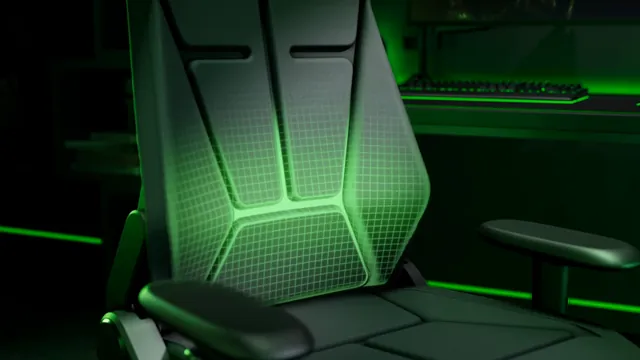
There are two ways to feed the motors.
- Games built for Sensa. More than 100 PC games send haptic cues straight to Razer's software, according to Razer's product pages. The titles it shows on the Soma Sensa HD Haptics page include Battlefield 6, Borderlands 4, 007 First Light, S.T.A.L.K.E.R. 2: Heart of Chornobyl, Hitman World of Assassination, Frostpunk 2, MechWarrior 5: Clans, SnowRunner and Sniper Elite: Resistance. In those, the developer decides what you feel.
- Audio-to-Haptics. For everything else, the chair listens to the sound and turns it into vibration. Razer pitches this for movies, music and games without native support. It is a guess based on sound, not data from the game, so a loud soundtrack can trigger it as much as a gunshot.
You can set the strength in two places. Razer Synapse, the company's Windows app, has one master haptic intensity slider from 1 to 6 and a separate setting from 0 to 100 percent for each of the six zones. The built-in control panel on the chair lets you raise or lower intensity and switch between haptic profiles without opening any app.
What the extra $430 buys on the Soma Pro
Speakers in the headrest
The Soma Pro's headrest has two wings with speakers built in, tuned with THX Spatial Audio, a format that places sounds around the listener rather than just left and right. Razer says the chair can carry the sound alone or work with a pair of front speakers on the desk, so the seat becomes the center of a surround setup. The cheaper Soma Sensa HD Haptics has no speakers, and the Furniture app on that model handles only its haptics.
Lighting that reacts to the game
The same wings carry Razer Chroma RGB lighting with 16.8 million colors. In more than 300 PC games with Chroma support, the lights react to what happens on screen, and Synapse can sync them with a Razer keyboard, mouse or speakers on the same desk. Brightness has 10 steps on the chair's own panel. Razer suggests 60 percent as a starting point, lower in a dark room with a glossy monitor, since a bright chair behind you can reflect off the screen.
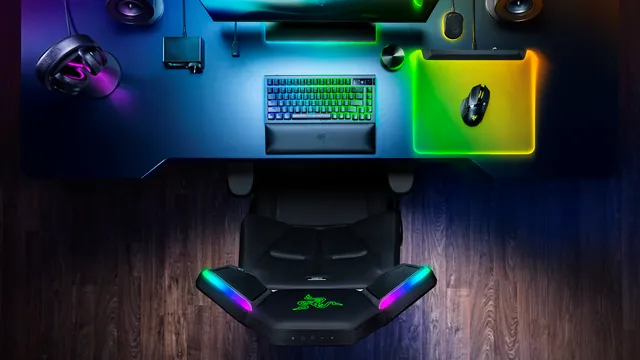
A more adjustable frame
The Soma Pro also gets the better chair hardware:
- 4D armrests, which move up and down, forward and back, side to side and swivel. Razer lists 50 degrees of inward and outward rotation.
- A magnetic head cushion that attaches to the headrest with magnets.
- A frog tilt mechanism, which lets the seat rock back with your feet still on the floor.
- A five-star powder-coated aluminum alloy wheelbase, where the Soma Sensa HD Haptics stands on a five-star steel base.
Both chairs share the rest: a steel frame, a built-in lumbar arch that supports the lower back without a loose pillow, a two-layer cold-cured foam seat with a soft top over a firmer core, and a backrest that reclines up to 132 degrees.
Razer Soma Pro specs and size: will it fit you?
Razer gives both new chairs the same measurements. The only difference on paper is the height range: the Soma Pro is recommended from 5 feet 5 inches, the Soma Sensa HD Haptics from 5 feet 3 inches.
| Spec | Soma Pro and Soma Sensa HD Haptics |
|---|---|
| Recommended user height | 5'5" to 6'6" (Pro), 5'3" to 6'6" (Sensa) |
| Maximum weight | 331 lbs (150 kg) |
| Floor-to-seat height | 16.1 to 20.1 in |
| Seat-to-armrest height | 7.1 to 11.0 in |
| Seat depth | 18.5 in |
| Seat pan width | 18.7 in at the front |
| Space between armrests | 18.3 in |
| Backrest height and width | 33.1 in by 22.8 in |
| Overall height | 49.2 to 53.1 in |
| Overall width and depth | 26.4 in by 28.1 in |
| Wheelbase width | 26.0 in |
| Recline | Up to 132 degrees |
At 18.3 inches between the armrests, the Soma suits average and slim builds better than wide ones: measure across your hips while seated before you order. The 26-inch wheelbase also needs that much clear floor, and more if the chair should roll back under a desk.
Power, connections and what's in the box
Neither chair has a battery of its own. Each takes power through a single USB-C port, from a wall outlet through a power adapter or from a portable power bank. That second option is how Razer gets a chair with motors and lights that doesn't trail a cable across the room. Razer lists the power bank requirements on each chair's specs page.
What comes in the box differs, and it changes the real price:
| In the box | Soma Pro | Soma Sensa HD Haptics |
|---|---|---|
| Chair with built-in control panel | Yes | Yes |
| USB-C extension cable | Yes, 200 mm | Sold separately |
| Hex key for assembly | Yes | Yes |
| Power adapter | Not included | Not included |
| Power bank | Not included | Not included |
So budget for at least a USB-C power supply or a power bank on top of the chair, and for the Soma Sensa HD Haptics, Razer's extension cable too if you want to run it from the wall.
Connections are wireless. A USB-A HyperSpeed Wireless dongle, Razer's 2.4 GHz link, connects the chair to a Windows PC running Synapse. Bluetooth Low Energy connects it to the Razer Furniture app on Android and iOS. A button on the control panel switches between the two.
Does the Razer Soma Pro work with PS5, Xbox or a phone?
Razer's pages describe a PC chair with a phone app. Game-driven haptics and reactive lighting come through Synapse, which runs on Windows, and every game Razer lists for Sensa and Chroma is a PC game. Razer names no console anywhere in the announcement or on the product pages.
The phone route is broader than it sounds. With the Furniture app, the chair can turn whatever a phone plays into vibration, so a movie or a mobile game can drive the motors without a PC. Razer notes one catch on iPhone: the feature listens through the system's screen recording, and apps with protected content can mute that audio, so the chair won't react to them.
Without any app at all, the control panel still works, but only partly. On the Soma Pro it adjusts haptics, audio and lighting with what Razer calls limited functionality. The Soma Sensa HD Haptics depends on software more: Razer says it needs Synapse on a PC for game haptics and Audio-to-Haptics, or the Furniture app for Audio-to-Haptics from a phone.
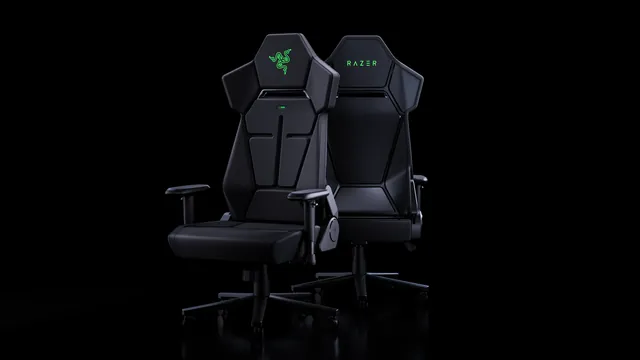
Razer Soma Pro warranty and returns
Razer puts a 3-year limited warranty on the Soma chairs and doubles it to 5 years at no charge for buyers who join its Extended Warranty Program, which covers chairs bought at Razer.com. The announcement breaks the coverage down further: 3 years on mechanisms and moving parts, 2 years on electronics. Orders from Razer's own store come with 14 days of risk-free returns, enough time to find out whether the vibration adds to a game or gets in the way.
Is the Razer Soma Pro worth $999.99?
That depends on what you play and where. The chair makes most sense for someone who plays on a Windows PC, owns other Razer gear and spends long evenings in Sensa-supported shooters or driving games, where a hit from the left actually lands on the left. For that player, it replaces a gaming chair, a pair of rear speakers and a lighting kit at once.
For a console player, the case is weaker. Without a direct link to the console, the chair has to work from audio through a phone, and the Soma Sensa HD Haptics delivers the same six motors for $430 less. Players who mostly want immersion through sound may get more from a good headset, such as Sony's PlayStation Pulse wireless headset, or from a Turtle Beach Stealth Ultra II controller that puts rumble in the hands.
And if feeling the game is the goal, a VR headset goes further for the money: see our guide to the best VR headset for what is worth buying this year.
FAQ
Where can I buy the Razer Soma Pro?
At Razer.com and at RazerStores, Razer's own shops. The store locator on Razer's site lists other places near you that sell its gear.
Can the Razer Soma Pro play music without a PC?
Yes. Paired over Bluetooth with the Razer Furniture app, the Soma Pro plays audio from a phone through its headrest speakers and can turn that audio into vibration.
How do I clean the Razer Soma Pro?
Unplug its power first, then wipe it about once a month with a microfiber cloth dampened with warm water. Razer warns against soap, chemical cleaners and abrasives, which can damage the fabric and the electronics underneath.
Add VR.one as a preferred source on Google and our stories show up more often in your Top Stories.