GameCube controller Switch 2
It looks like the 2001 pad, but it charges over USB-C, opens GameChat with the C Button and refuses to work on the first Switch.
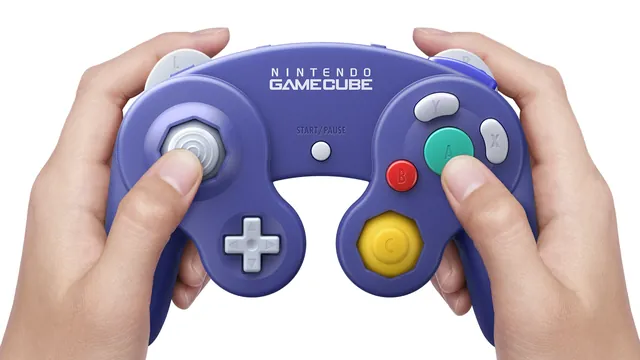
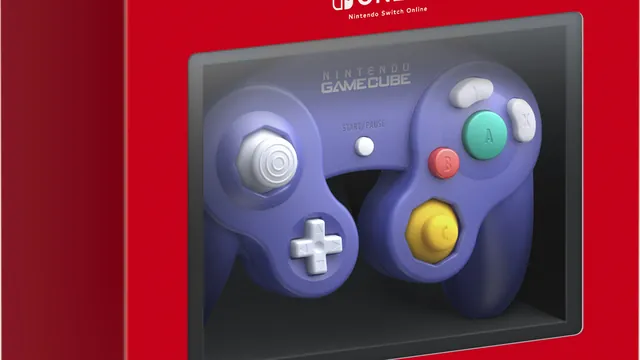
The GameCube controller for Switch 2 costs $69.99 on Nintendo Store, and only paid Nintendo Switch Online members in the U.S. and Canada can buy it, up to four per Nintendo Account. It is wireless, charges over USB-C, works only with Nintendo Switch 2 and is built for the GameCube – Nintendo Classics library, which needs the $49.99-a-year Nintendo Switch Online + Expansion Pack tier. Nintendo calls it optional: every game in the GameCube library plays without it.
The controller is back in the conversation because the library keeps growing. Nintendo's latest update for Expansion Pack members, posted November 23, 2026, added Wave Race Blue Storm, the 2001 watercraft racer, and The Legend of Zelda: The Wind Waker has been in the collection since day one. Here is what the controller costs, who can buy it, what it changes from the 2001 original and what it plays.
How much is the GameCube controller for Switch 2
Nintendo Store lists the controller at $69.99 and shows it in stock. Nintendo's own support FAQ still gives $64.99, the price Nintendo set when it announced the controller, so the store page is the one to trust at checkout.
A few costs sit on top of the sticker price:
- Shipping is $6.99 by UPS Ground, three to nine business days, and free on orders over $50, which the controller alone clears.
- A California shipping address adds a 1.5% Environmental Waste Recycling Fee, because the controller has a lithium-ion battery.
- Sales tax applies as usual.
The controller belongs to a family of classic-style pads that Nintendo sells only to members. Here is how its price compares with the rest of that shelf on Nintendo Store today.
| Nintendo Store controller | Price | Sold only on Nintendo Store |
|---|---|---|
| Nintendo GameCube Controller | $69.99 | Yes, members only |
| Nintendo 64 controller | $54.99 | Yes |
| Nintendo Entertainment System Controllers | $69.99 | Yes |
| SEGA Genesis Control Pad | $54.99 | Yes |
| Nintendo Switch 2 Pro Controller | $89.99 | No, sold at retail too |
The GameCube pad costs $20 less than a Pro Controller, but it isn't a substitute for one. It is a controller for one library of games, and the next sections explain why. ## Who can buy the GameCube controller
Any paid Nintendo Switch Online member in the U.S. or Canada can order it, on either tier. Free trial memberships don't qualify, and the offer isn't open in every country. Nintendo Store caps it at four controllers per Nintendo Account, enough for a full four-player match on one console.
Buying the controller and playing GameCube games are two different things, though. The basic tier lets you buy the pad, but the GameCube – Nintendo Classics library opens only with Nintendo Switch Online + Expansion Pack. A basic member who buys the controller ends up with a pad and nothing to play.
| Membership | Individual, per year | Family, per year (up to 8 accounts) | Can buy the controller | Plays GameCube games |
|---|---|---|---|---|
| Nintendo Switch Online | $19.99 | $34.99 | Yes | No |
| Nintendo Switch Online + Expansion Pack | $49.99 | $79.99 | Yes | Yes |
A family plan stretches furthest here. Shared among eight people, the Expansion Pack family membership works out to about $10 per person a year, and every account in the family gets the GameCube library. Our Nintendo Switch Online guide walks through everything else each tier includes.
Nintendo says the controller isn't a limited-time offer, so there is no deadline to beat.
What's different from the original GameCube controller
The shell, the button layout and the indigo color copy the controller that shipped with the GameCube in 2001: the big green A button, the kidney-shaped X and Y, the yellow C stick, the analog L and R triggers and the Z button. What changed sits mostly inside and along the top edge.
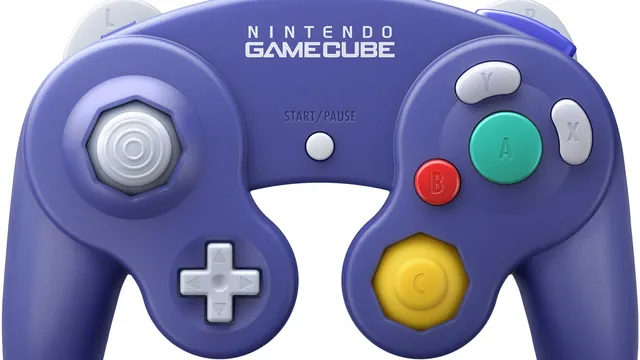
- Wireless. The original plugged into the console with a cable. The new one connects wirelessly and runs on a built-in lithium-ion battery.
- USB-C charging. The included USB cable charges the battery and pairs the controller with the console the first time.
- C Button. A new button that starts GameChat, the Switch 2 voice and video chat, so a group can talk during an online match.
- Home and Capture buttons. The Capture Button takes a screenshot or a short video clip, as on Joy-Con 2.
- Sync Button and LEDs. A Sync Button for pairing, a Player LED that shows which player you are and a Recharge LED for the battery.
- Motion controls. Nintendo's listing says the controller works with motion controls in compatible games, something the original never had.
Everything a GameCube game expects is still there, so a game such as F-Zero GX or SOULCALIBUR II plays the way it did on the original console. ## Does the GameCube controller work with other Switch 2 games
It connects, but Nintendo doesn't promise it will play them well. The company designed it for the GameCube – Nintendo Classics collection and says that, because it lacks some of the buttons and features of other Switch 2 controllers, there may be issues in other games. The plain reason is the layout: a modern Switch 2 game can call for controls a GameCube pad was never built with, such as sticks you press down like a button.
So the GameCube pad suits a few kinds of player:
- people who play the GameCube library and want the original grip and button feel
- groups that play four-player GameCube games on one console, such as Super Mario Strikers
- fans who simply want the 2001 controller back on the shelf, now wireless
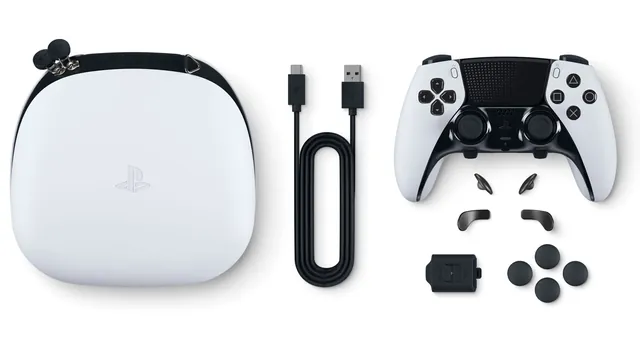
For a main controller across every Switch 2 game, the Pro Controller or Joy-Con 2 stays the better pick. Our Zelda Switch 2 Pro Controller story covers the special edition Pro Controller, and the Ocarina of Time Switch 2 controls guide lists every button the Zelda remake uses on standard Switch 2 controllers.
Does it work on the first Nintendo Switch
It doesn't. Nintendo says the controller can only be used on Nintendo Switch 2, and the GameCube library itself is a Switch 2 exclusive. Owners of the original Switch or Switch Lite have no GameCube games to play with it.
Which GameCube games can you play on Switch 2
The GameCube – Nintendo Classics library opened on June 5, 2025, alongside the Switch 2 itself, and Nintendo adds games in updates for Expansion Pack members. These are the games Nintendo names on its store pages and in its update posts.
| Game | In the library since |
|---|---|
| The Legend of Zelda: The Wind Waker | Launch, June 5, 2025 |
| F-Zero GX | Launch, June 5, 2025 |
| SOULCALIBUR II | Launch, June 5, 2025 |
| Chibi-Robo! | Update posted August 21, 2025 |
| Wario World | Update posted December 11, 2025 |
| Fire Emblem: Path of Radiance | Update posted January 8, 2026 |
| Pokémon XD: Gale of Darkness | Update posted March 17, 2026 |
| Super Mario Sunshine | Update posted August 13, 2026 |
| Wave Race Blue Storm | Update posted November 23, 2026 |
Super Mario Strikers is in the library too: Nintendo names it on the controller's store page as one of the games to play with it. The collection runs at up to four players on one console and up to four online, so the four-controller limit matches the biggest local match the library supports.
The library adds two features the original console never had. A retro CRT mode makes the picture look like an old tube TV, and suspend points let you stop anywhere and pick up later, which Nintendo pitches as a way to take a break in the middle of a Wind Waker dungeon. ## How to pair and set up the GameCube controller
Setup takes a couple of minutes, and the cable in the box does most of it.
- Update the console first. Nintendo says the controller needs a system update: open System Settings on the HOME Menu, go to System and select System Update.
- Connect the controller to the Switch 2 with the included USB cable. That pairs it with the console and starts charging the battery.
- Unplug it and play wirelessly. The Player LED shows which player number the controller has.
How to remap the buttons
The Switch 2 System Settings can't remap the GameCube controller, but the GameCube library can, game by game. While a game from the collection is running, press ZL to open the Suspend Menu, select View/Change Controls and then Change Controls. The library lets every controller keep its own mapping, so two players on one console can set up their pads differently.
Can you use an original GameCube controller on Switch 2
Yes, a wired GameCube controller from 2001 works on Switch 2 through the GameCube Controller Adapter, which is sold separately. Nintendo's support steps for it:
- Install the latest system update.
- Put the console in its dock, in TV mode.
- Plug both USB plugs of the adapter into the Switch 2 dock.
- Turn the console on, plug the controller into a port on the adapter and press any button to register it.
The console treats the wired pad as a standard USB controller. Vibration works only in supported software, and Nintendo names Super Smash Bros. Ultimate as one. The adapter route ties you to the dock and to TV mode, while the new controller needs no cable once it is charged.
For players who still own the original pads and an adapter, that is a way to play the GameCube library without spending $69.99. For everyone else, the members-only controller is the only new GameCube pad Nintendo sells.
Is the GameCube controller worth it
It depends on how much of the GameCube library you plan to play. For Wind Waker, F-Zero GX, Super Mario Sunshine and now Wave Race Blue Storm, the original shape matters: the games were tuned around that big A button, the C stick and the triggers, and the pad brings back the feel those games were built for. For four-player Super Mario Strikers or SOULCALIBUR II nights, four of them on one account cover a full couch.
As a general Switch 2 controller, it falls short by Nintendo's own description, and it doesn't work on the first Switch at all. Count the membership too: without the $49.99 Expansion Pack tier, there is nothing for the controller to play.
Shoppers watching prices this week can check our Switch 2 Black Friday guide, which lists this week's prices on Nintendo hardware and accessories.
FAQ
Does the GameCube controller come with a game?
The box holds the controller and a USB cable. The games come from the GameCube – Nintendo Classics library, which opens with a Nintendo Switch Online + Expansion Pack membership.
Can I buy the GameCube controller at a store like Target or Best Buy?
Nintendo sells it only through Nintendo Store, its own online shop, to paid members in the U.S. and Canada.
Does the GameCube controller have rumble?
Nintendo's listing for the wireless model names the Capture Button, the C Button and motion controls in compatible games, and it doesn't list rumble among its features.
Add VR.one as a preferred source on Google and our stories show up more often in your Top Stories.