GTA 6 headset
Rockstar made no official GTA 6 headset, and the setting that changes how Vice City sounds lives in the console menu, not the game.
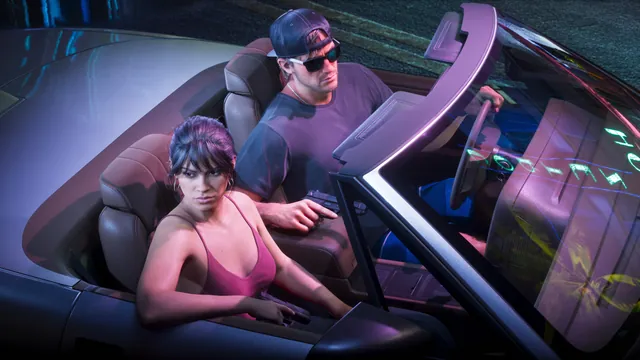
There is no official GTA 6 headset: Sony released a limited-edition GTA 6 controller for launch day, but no themed headset. What matters is 3D audio. On PS5, Grand Theft Auto VI supports Tempest 3D Audio, Sony's positional sound, and on Xbox Series X and S the Microsoft Store lists spatial sound, Dolby Atmos and DTS:X for the game. Any headset you plug in or pair gets that positional sound once you switch it on in the console's settings. Sony's own picks run from the $99.99 Pulse wireless headset, out since November 19, 2026, to the Pulse Elite, which PlayStation Direct sells for $109.00 instead of $149.00 through December 21, 2026. On Xbox, the Xbox Wireless Headset lists at $119.99 and the Microsoft Store has it at $107.99, with Dolby Atmos included.
So the shopping list is shorter than the trend suggests. If you already own a headset, the free step is the console setting. If you are buying one for Vice City, the choice comes down to which console you play on, whether you want wireless and whether you also want the headset on a phone or PC.
Does GTA 6 support 3D audio
Yes, on both consoles. Sony's page for the game lists Tempest 3D Audio next to haptic feedback and adaptive triggers, and the PlayStation Store listing names 3D Audio among the game's audio features, along with volume controls and mono audio. On Xbox, the Microsoft Store entry for Grand Theft Auto VI carries three audio tags: spatial sound, Dolby Atmos and DTS:X. It is also marked Optimized for Xbox Series X and S.
Positional audio, also called 3D or spatial audio, places each sound at a point around your head rather than only left or right. In an open world that is less about style and more about information: a siren behind you, a car on your blind side, a shot from a rooftop above. Stereo headphones carry left and right well, but front, back and height are where 3D processing does its work.
| Console | What the store lists for GTA 6 | Where it comes from | Cost |
|---|---|---|---|
| PS5 and PS5 Pro | Tempest 3D Audio | The console, with any headset | Free |
| Xbox Series X and S | Spatial sound, such as Windows Sonic | The console, with any headset | Free |
| Xbox Series X and S | Dolby Atmos | Dolby Access app license | Paid, included with the Xbox Wireless Headset |
| Xbox Series X and S | DTS:X | DTS app and supported hardware | May require a purchase |
The key point for buyers: on both consoles, the 3D effect is processed by the console, not the headset. A $20 pair of wired earbuds and a $150 wireless headset both receive the same Tempest or Windows Sonic mix. What a better headset changes is the drivers, the microphone, the battery and how it connects, not whether you hear GTA 6 in 3D.
How to turn on 3D audio for GTA 6 on PS5
Sony keeps 3D audio in the PS5's system settings, and it applies to every supported game, GTA 6 included.
- Go to Settings > Sound.
- Select 3D Audio (Headphones).
- Choose Create Personalized 3D Audio Profile and follow the prompts. You listen to tones from different positions and answer where each one seems to come from. If you'd rather skip that, pick one of the five presets.
- Turn on Enable 3D Audio for Headphones. Stereo switches to 3D audio; turning it off switches back.
Once a personalized profile exists, Apply Personalized 3D Audio Profile decides whether the console uses it or the preset. Sony says profiles are saved for each user on the console, so two players sharing one PS5 can each keep their own.
Playing through TV speakers works too. 3D Audio (TV) in the same menu measures your room with the DualSense's built-in microphone from where you normally sit. Sony's advice is to measure again whenever you move the TV or the couch.
How to set up Dolby Atmos for GTA 6 on Xbox
On Xbox Series X and S, the headset format starts at stereo until you change it. Open Profile & system > Settings > General > Volume & audio output and pick a format under the headset audio options:
- Windows Sonic for Headphones, Microsoft's own spatial sound, built into the console and free with any headset.
- Dolby Atmos for Headphones, which Microsoft calls a premium format that works with all headsets. Choosing it opens the Dolby Access app, a free download where the Atmos license itself is bought.
- DTS Headphone:X, an object-based surround format that Microsoft says may need extra purchases, an app and supported hardware.
GTA 6 is tagged for both Dolby Atmos and DTS:X, so whichever of the paid formats you already own, the game uses it. If you own neither, Windows Sonic gives you positional sound in Vice City for nothing.
PlayStation headsets for GTA 6
Sony sells three wireless Pulse products in the US, and all of them connect to the PS5 through PlayStation Link, Sony's own wireless connection with a USB adapter in the box. The newest arrived on GTA 6's launch day.
| Model | Type | US price | Battery | What sets it apart |
|---|---|---|---|---|
| PlayStation Pulse wireless headset | Over-ear headset | $99.99 | Up to 30 hours | Planar magnetic drivers, PlayStation Link and Bluetooth at once, built-in mic |
| Pulse Elite wireless headset | Over-ear headset | $109.00 on PlayStation Direct (usually $149.00) | Up to 30 hours | Retractable boom mic, charging hanger |
| Pulse Explore wireless earbuds | Earbuds | $119.00 on PlayStation Direct (usually $149.00) | Up to 5 hours, plus 10 more from the case | Earbuds that also connect to PlayStation Link |
The Pulse, in White and Midnight Black, is the cheapest headset with planar magnetic drivers Sony has made. Planar magnetic drivers move a thin flat membrane between magnets instead of a cone, and Sony says the larger planar drivers in the new Pulse give fuller, deeper bass. It can stay on PlayStation Link for the PS5 and Bluetooth for a phone at the same time, so a call doesn't pull you out of the game. We covered its specs in full in our story on the PlayStation Pulse wireless headset.
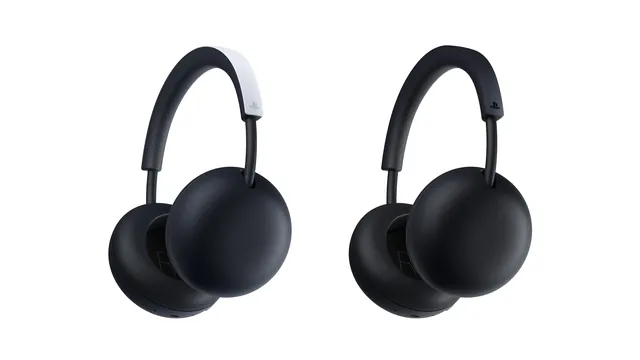
The Pulse Elite and Pulse Explore are part of Sony's holiday sale on PlayStation Direct, with $40 off the Elite and $30 off the Explore until December 21, 2026. The rest of that sale, from DualSense controllers to games, is in our guide to PS5 Black Friday deals.
Xbox Wireless Headset and GTA 6
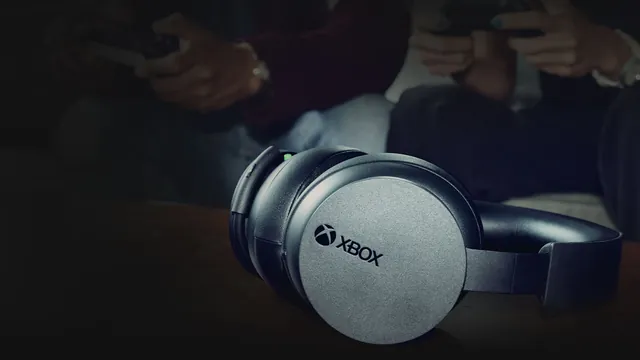
Microsoft's own headset is the simplest match for GTA 6 on Xbox, because it is the one model that comes with Dolby Atmos for Headphones at no extra cost. It also lists Windows Sonic and DTS Headphone:X support on Xbox Series X and S and Xbox One. It pairs straight to the console over Xbox Wireless with no adapter, and it can pair to a phone over Bluetooth at the same time.
| Spec | Xbox Wireless Headset |
|---|---|
| Price | $119.99 list, $107.99 on the Microsoft Store now |
| Battery | Up to 20 hours; 30 minutes of charging gives about 4 hours |
| Drivers | 40 mm |
| Microphone | Bendable boom with two mics and a light when the mic is on |
| Controls | Earcup dials for volume and game and chat balance |
| Connections | Xbox Wireless and Bluetooth 5.3 |
| Weight | 11 oz |
The game and chat dials matter more than usual in GTA 6, where radio stations, phone calls and online voice chat all compete with the street. The Xbox Accessories app adds an equalizer, bass boost, auto-mute and mic monitoring, which lets you hear your own voice in the headset. The Microsoft Store's lower price runs through December 31, 2026.
Can you use any headset with GTA 6
Yes. Both consoles send game audio to almost any headset, and 3D audio works with all of them because the console does the processing.
- Wired headsets. The DualSense and the Xbox Wireless Controller both have a 3.5 mm jack, so any headphones with a standard plug work through the controller.
- PlayStation Link and Xbox Wireless headsets. These connect to the console directly. Third-party models built for either system work the same way as Sony's and Microsoft's.
- USB headsets and adapters. Many wireless headsets use a USB dongle in the console. Check that the box names your console.
If you play GTA 6 on a PlayStation Portal, the handheld that streams games from your PS5, its audio options are narrower. We explained what it supports in our story on GTA 6 on PS Portal.
GTA 6 audio settings in the game
Inside Grand Theft Auto VI, Rockstar puts sound under Pause Menu > Settings > Audio, split into Setup, Volume and Narration. Set the console first, then the game: 3D audio on PS5 and the headset format on Xbox sit outside the game, and the in-game menu adjusts the mix on top of them.
Two features on the PlayStation Store listing help players who hear better on one side. Mono audio folds the mix into a single channel, so nothing important plays only in one ear, and volume controls let you turn down or mute individual parts of the sound. The listing also names a basic screen reader.
The rest of the hardware question is the controller. Sony's limited-edition pads change only the look, and every DualSense gives GTA 6's haptic feedback and trigger effects, as our guide to the GTA 6 controller explains.
FAQ
Does the PlayStation Pulse headset work on Xbox?
Sony lists PS5, PlayStation Portal, PC, Mac and mobile devices for the Pulse, and Xbox isn't on that list. For GTA 6 on Xbox Series X and S, pick a headset made for Xbox Wireless or plug a wired one into the controller.
Does GTA 6 have Dolby Atmos on PS5?
Sony's page for the PS5 version lists Tempest 3D Audio, Sony's own positional sound, and neither Sony nor Rockstar lists Dolby Atmos for it. Tempest needs no license and works with any headset on PS5 and PS5 Pro.
Does the Xbox Wireless Headset work on PC?
It does. Microsoft lists Windows 10 and 11 support over Bluetooth 4.2 or newer, or with a compatible USB-C cable, sold separately, so the same headset can move from GTA 6 on the console to a desk PC.
Add VR.one as a preferred source on Google and our stories show up more often in your Top Stories.