Steam Deck average framerate: where to find it and how to read it
The numbers come only from owners who agreed to share them, and Valve filters them hard before they reach the store.
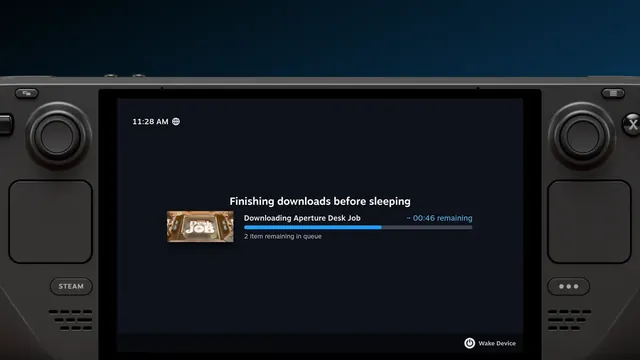
Steam now shows the average framerate that Steam Deck players actually get in a game, right on its store page. Valve switched the feature on for everyone on November 11, 2026: open any game on the Steam Store, go to Steam Deck Compatibility and press Learn more, and you'll see the average plus a histogram of how often the game runs at each framerate. The same numbers appear in the Steam Library on the desktop client and on the Deck itself. Thousands of games already have data, and Valve says the Deck is only the starting point.
Framerate is the number of images a game draws each second, written as FPS (frames per second). Until now the only guide to how a game would run on Valve's handheld was its compatibility badge, which says whether a game works but not how smoothly. The new figures come from real players, which makes them the closest thing to a performance benchmark the store has ever shown.
Where to find Steam Deck average framerate on Steam
There are two places to look.
- On the store page. Scroll to the Steam Deck Compatibility block and select Learn more. For games with enough data, the window that opens shows the average framerate, and an expandable detail view shows the histogram.
- In your Library. The Hardware Compatibility dialog for a game now includes the average framerate players get on the Deck. This came with the Steam Client Update of November 11, 2026, on desktop and on the Deck.
Valve first put the numbers into the Steam Client Beta, then opened them to all users on November 11, both on the store and in the regular client.
If a game shows no framerate, it is usually one of two things. The data covers only games Valve has tested for the Deck, rated Verified, Playable or Unsupported; games still marked Unknown have none. And Valve sets a minimum number of data points before it publishes anything, so a game with few Deck players may stay blank until enough sessions come in.
How Valve calculates the average framerate
Every number comes from Steam Deck owners who agreed to share anonymized framerate data. Valve says a majority of Deck players have opted in, across a wide range of games and play styles, so the averages rest on a large pool of real sessions rather than lab runs.
Valve cleans that data before it reaches the store:
- Only default frame limits count. The Deck lets players cap the framerate to save battery. Valve keeps only samples from Decks left at the default limit: 90 FPS on the Steam Deck OLED and 60 FPS on the Steam Deck LCD. That way a player who capped a game at 30 to stretch a flight doesn't drag the average down.
- Idle time is dropped. Valve filters out idle time and invalid samples.
- Each session gives several samples. Valve takes more than one reading per play session, so a game that starts smooth and slows down later shows both.
What Valve does not account for is in-game graphics settings. One player may run a game on low and another on high, and both count. Valve says that, even so, the data tends to cluster around fairly narrow ranges.
| What the data includes | What it leaves out |
|---|---|
| Opted-in Steam Deck players | Players who said no to sharing |
| Decks at the default 90 FPS (OLED) or 60 FPS (LCD) limit | Decks with a custom frame cap |
| Games rated Verified, Playable or Unsupported | Games not yet reviewed (Unknown) |
| Several samples per play session | Idle time and invalid samples |
| Every graphics preset players choose | Any adjustment for those presets |
How to read the framerate histogram
The average is one number; the histogram shows how it was built. Each column is a framerate, and its height is the share of all samples recorded at that framerate. A game with one tall column near 60 or 90 runs steadily. A game whose columns are spread out runs unevenly.
Small columns at the low end are the ones to watch. Valve says those usually mean hitches or stutter, short moments when the game drops frames during loading, a busy fight or a new area. A game can post a decent average and still feel rough if a noticeable share of its samples sits far below it.
Why some games show a gap between 90 and 45 FPS
Some histograms look strange: a big column at 90, another at 45 and almost nothing in between. Valve explains this as a side effect of VSync, short for vertical sync, which ties the game's output to the screen's refresh rate so the picture doesn't tear.
On the Deck OLED's 90 Hz screen, a game that can't hold 90 FPS gets dropped to 45 for the frames it misses, then returns to 90. Valve's example: a game running at about 75 FPS shows up as a pattern like 90, 90, 45, 90, 90, 45, which averages out to 75. The same thing happens to games with their own 60 FPS cap on an OLED Deck at the default 90 limit: they bounce between 90 and 45 to land on 60.
So a 90-and-45 split isn't a sign of a broken game. It's the screen and the game meeting halfway, and the average above the chart is the number that tells you how close the game gets to 90.
Why Valve added framerate data to Deck Verified
Deck Verified, the compatibility program Valve runs for its handheld, sorts every reviewed game into one of four groups:
- Verified: works great on the Deck right out of the box.
- Playable: may need some manual tweaking, such as picking a community controller layout or using the touchscreen to get through a launcher.
- Unsupported: currently doesn't work on the Deck.
- Unknown: not checked yet.
To earn the Verified badge, a game has to pass four checks: full controller support with the right button icons, support for the Deck's 1280x800 or 1280x720 resolution with legible text, no compatibility warnings or mouse-only launchers, and, for Windows games running through Proton, support for the game and all its middleware, anti-cheat included. Proton is the compatibility layer that lets Windows games run on SteamOS, the Linux-based system the Deck runs.
Those are standard criteria, and Valve admits they don't match every player's bar. Performance is where the gap shows most. A game can be marked Unsupported because its framerate is unstable, yet some players would happily play it anyway. A Verified game, on the other hand, may never reach the framerate a demanding player wants. The averages are meant to fill that gap, so buyers can decide for themselves before they spend money.
How to turn framerate sharing on or off
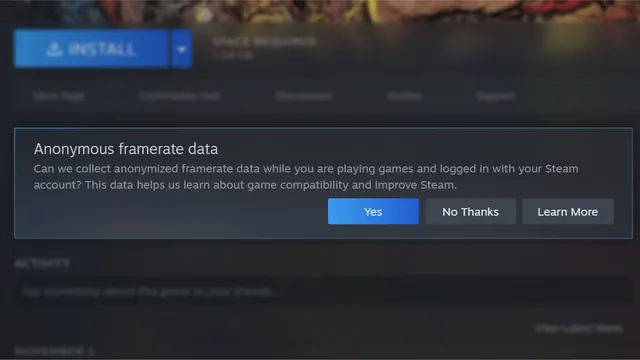
Steam asks once, with a prompt in the Library. You can change your answer at any time in Steam Account Settings > Data & Browsing > Anonymous Game Framerate Data.
Saying no doesn't hide the averages from you: everyone sees them, whether or not they share their own sessions. Saying yes adds your Deck's samples to the pool, which helps games with small player counts cross Valve's minimum and get a number at all.
Will Steam show framerate data for PCs and other devices?
Valve calls the Deck figures "a stepping stone" toward framerate data for more devices. The Deck came first for a practical reason: every unit has the same hardware, so an average means the same thing to every owner. On a Windows desktop, the same game can run at wildly different framerates depending on the graphics card, processor and resolution, and Valve hasn't said how it will present that.
The groundwork is already in place. The opt-in prompt for anonymized framerate data now shows up in the Steam desktop client too, so far only in the Steam Client Beta, and Valve says it will ship to all users in the future. Valve hasn't said which devices get averages next or when.
Steam Deck OLED vs LCD: what the default frame limits mean for you
Because the averages are tied to each model's default frame limit, the model you own decides which ceiling a game is measured against. Valve's own spec sheet shows why the two differ.
| Spec | Steam Deck LCD | Steam Deck OLED 512GB | Steam Deck OLED 1TB |
|---|---|---|---|
| Screen | 7-inch LCD, 1280x800 | 7.4-inch HDR OLED, 1280x800 | 7.4-inch HDR OLED, 1280x800, anti-glare etched glass |
| Refresh rate | Up to 60 Hz | Up to 90 Hz | Up to 90 Hz |
| Default frame limit in the data | 60 FPS | 90 FPS | 90 FPS |
| Chip | 7 nm APU | 6 nm APU | 6 nm APU |
| Battery | 40 Whr, 2-8 hours | 50 Whr, 3-12 hours | 50 Whr, 3-12 hours |
| Price on steamdeck.com | No new-unit price listed | $789.00 | $949.00 |
An APU is a chip that puts the processor and the graphics on one piece of silicon. Both models share the same 1280x800 resolution, so the OLED's higher ceiling comes from its faster screen, not from extra pixels. In practice, a game that hits a flat 60 on an LCD Deck has reached its limit there, while the same game on an OLED still has headroom up to 90.
Two other Deck changes came in the same November 11 client update. Remote Play, which streams games from a PC to the Deck, got a rebuilt HDR setup, and HDR streaming works on the Steam Deck OLED again. The Big Picture interface the Deck uses also got a more responsive Quick Access Menu. For the October system release itself, see our SteamOS 3.9 update guide.
What the new data means if you're shopping for a handheld
For anyone weighing a Deck against newer Windows handhelds such as the ROG Xbox Ally X20, the averages are a rare thing: performance numbers from the people who own the device rather than from the company selling it. Check the histogram for the three or four games you play most before you buy. If they sit near the top of the chart with little at the low end, the Deck will handle them fine; if they straddle 30 or show long tails, you'll be adjusting settings.
The same logic will matter more as Valve's family grows. SteamOS now runs on the Steam Machine and on the Steam Frame headset too, and each of them has different hardware from the Deck, so any averages Valve adds for them will need reading on their own terms.
FAQ
Do I need the Steam Client Beta to see the averages?
The regular Steam client is enough: the framerate figures left beta and now show in the standard client and on the store, on a desktop PC and on the Deck.
Does the Verified badge still matter now that framerates are listed?
It does: the badge covers controls, text size, launchers and Proton support, none of which a framerate number shows, so the two work best read together.
Add VR.one as a preferred source on Google and our stories show up more often in your Top Stories.