Xbox Nano Controller: price, battery life, size and what it works with
Microsoft's smallest pad keeps every standard button, swaps AA cells for a sealed battery and lists no headset jack.
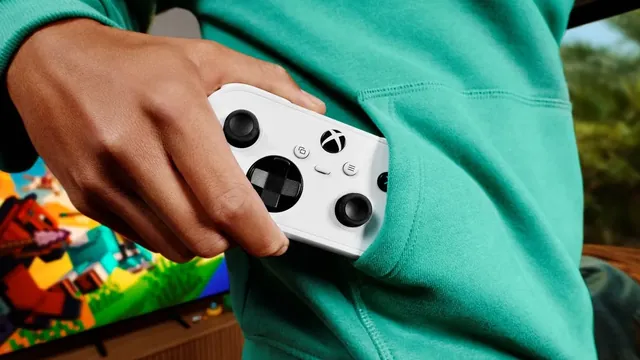
The Xbox Nano Controller costs $49.99 in the US and went on sale November 4, 2026. It is Microsoft's smallest controller: 133 mm long (a little over 5 inches) and 101 grams (about 3.5 ounces), with all 18 inputs of a standard Xbox pad, a built-in rechargeable battery rated for up to 5 hours, and both Xbox Wireless and Bluetooth. It works with Xbox Series X and S, Xbox One, Windows 10 and 11 PCs, iOS and Android devices and select smart TVs. A USB-C charging cable is not in the box.
It is a different kind of product from the full-size pad, not a shrunken copy of it. Below are the official specs, what the Nano gives up, the devices it pairs with, and the holiday bundles that put one in the box with a TV or a headset.
Xbox Nano Controller price and release date
Microsoft announced the Nano on October 14, 2026, opened preorders the same day and said it would arrive in November. It reached stores on November 4, the same day Xbox began testing a Wi-Fi feature built for it. Every official image shows it in white, and Microsoft hasn't announced other colors.
Microsoft's regular Xbox Wireless Controller costs $15 more at list price, though the store marks that pad down from time to time.
| Detail | Xbox Nano Controller |
|---|---|
| Announced | October 14, 2026 |
| On sale | November 4, 2026 |
| Color | White, the only color shown |
Xbox Nano Controller specs and size
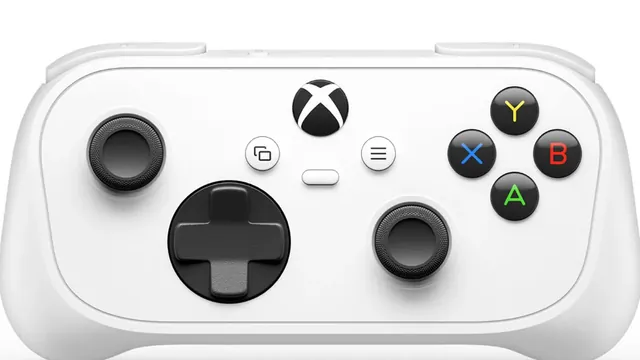
The Nano is not a cut-down button set. It carries every standard gameplay input of a regular Xbox controller: both sticks, the d-pad, the four face buttons, bumpers, triggers and the system buttons. What shrinks is the shell. Microsoft describes it as lighter and shorter than most modern smartphones, so it slides into a coat pocket where a full-size pad would not.
| Spec | What Microsoft lists |
|---|---|
| Dimensions | 133 x 66.5 x 36.6 mm |
| Weight | 101 g |
| Inputs | 18 standard gameplay inputs |
| Extra button | Programmable Action Button |
| Wireless | Xbox Wireless (consoles), Bluetooth (PCs, phones, tablets, TVs) |
| Wired | USB-C |
| Battery | Internal, rechargeable |
| Updates | Background firmware updates |
The Action Button is the one control a standard pad doesn't have. Out of the box it can be set to take a screenshot, record a gameplay clip or fire another shortcut you use often. The Xbox Accessories app also lets you remap the regular buttons, so a child who struggles with a bumper can move that function to a face button.
Microsoft also lists background firmware updates among the extras, a small convenience for a pad that may spend most of its life paired to a phone or a TV rather than a console.
Battery life and charging
This is where the Nano departs most from the controller most Xbox owners already have. The standard Xbox Wireless Controller runs on two AA batteries and Microsoft rates it for up to 40 hours. The Nano has a sealed internal battery that charges over USB-C, and Microsoft's store rates it for up to 5 hours of play per charge. Microsoft adds its usual warning that real battery life varies a lot with accessories and use.
Five hours covers a flight or a long evening, not a week of play. In practice the Nano works best as a pad you top up the way you top up a phone: plug it in after a session and it is ready the next day. Because it also supports wired play over USB, a flat battery doesn't end a session at a desk or next to a console.
The charging cable is the catch. The box holds the controller and nothing else, and Microsoft's spec sheet says a USB-C cable is required and sold separately. Most homes have one from a phone, tablet or recent console accessory, but a buyer giving the Nano as a gift should put a cable in the bag too.
The battery is not a dead end, either. Microsoft's service guide for the Nano, updated on launch day, lists the battery as a replaceable service part with its own part number, so a worn cell doesn't have to mean a new controller.
Xbox Nano Controller vs Xbox Wireless Controller
The Nano and the full-size pad share a layout and a wireless standard, and they diverge on almost everything you hold or plug in.
| Xbox Nano Controller | Xbox Wireless Controller | |
|---|---|---|
| US list price | $49.99 | $64.99 |
| Power | Internal rechargeable battery | Two AA batteries |
| Rated battery life | Up to 5 hours | Up to 40 hours |
| Headset jack | Not listed in specs | 3.5 mm stereo jack |
| Extra button | Programmable Action Button | Share button |
| Colors | White | Several, plus custom builds in Xbox Design Lab |
| Smart TVs over Bluetooth | Listed | Not listed |
Two gaps deserve a closer look before you buy. The first is audio. Microsoft's page for the standard pad advertises its 3.5 mm stereo jack for plugging in a wired headset. The Nano's specs list no such jack, so for voice chat on a console plan on a headset that connects to the Xbox directly, or on the TV's speakers.
The second is rumble. Neither Microsoft's product page nor its store listing names vibration among the Nano's features, while vibration settings remain a standard part of the full-size pad. Players who rely on rumble in racing games such as Forza Horizon 6 will notice the difference.
The Share button on the standard pad and the Action Button on the Nano overlap: both can grab screenshots and clips. The Nano's version is simply open to other shortcuts as well.
What the Xbox Nano Controller works with
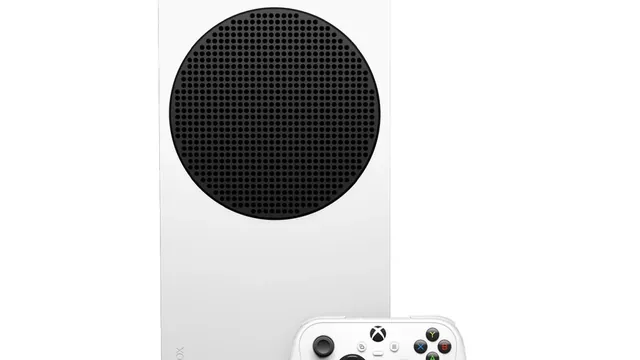
Microsoft lists five kinds of devices, and the connection type differs by device:
- Xbox Series X and S, and Xbox One: Xbox Wireless, the console's own low-latency radio link. Microsoft says the Nano plays games from across four generations of Xbox, since backward-compatible original Xbox and Xbox 360 titles run on current consoles.
- Windows 10 and 11 PCs: Bluetooth, or a USB-C cable. The cable is also how the Xbox Accessories app on Windows reaches the controller for remapping.
- iPhone, iPad and Android phones and tablets: Bluetooth, for games with controller support and for streaming Xbox games over the Xbox app.
- Select smart TVs: Bluetooth, for TVs that run the Xbox app and its cloud games.
- The web: through cloud connect, covered below, on a browser that runs Xbox Cloud Gaming.
Microsoft's fine print adds that on mobile devices and over Bluetooth some functions may not be supported, and that it works only with games that support a controller. Its controller-compatibility page lists the exact operating system versions.
What isn't on the list matters too. Microsoft doesn't name PlayStation or Nintendo consoles, and it hasn't said whether the Nano works with handheld gaming PCs beyond what Windows Bluetooth support covers. Devices like the ROG Xbox Ally X20 already have built-in controls, so the Nano's role there would be docked play on a TV.
Cloud connect: the Wi-Fi mode built for the Nano
On launch day Xbox started a US-only preview called cloud connect. Normally a controller talks to the TV or phone over Bluetooth, and that device relays your inputs to the cloud server running the game. With cloud connect, the Nano joins your home Wi-Fi and sends inputs straight to that server, skipping the middle hop. Microsoft says this can reduce input latency, the delay between a press and the result on screen.
For now it is an early test. It works on supported smart TVs and in the web version of Xbox Cloud Gaming, not on consoles or in every cloud game. Setup runs through the Xbox beta app on Android or through the Xbox Accessories app on Windows, where it requires enrollment in the Xbox Insider program. You connect the controller to your Wi-Fi in the app, then sign in to cloud gaming with the same Xbox account.
Cloud play is moving to monthly hour allowances on Game Pass, so how much a TV-only player can use the Nano depends on the plan. We explained the hours and prices in our guide to Xbox Cloud Gaming limits.
Xbox Nano Controller bundles with Samsung TVs and Meta Quest
Microsoft is using the Nano as a way into Xbox for people who don't own a console, and two US holiday offers show how.
The first is with Samsung. Buyers of select Samsung TVs this holiday season can get a Nano plus two months of Game Pass Ultimate, the second part for new members only. Samsung TVs carry the Xbox app inside the Gaming Hub, so the pitch is a full Xbox library on the TV with no box under it: pair the controller and stream from the cloud.
The second is with Meta. Buying a Meta Quest headset in the US can come with the same pairing of a Nano and two months of Game Pass Ultimate for new members. Xbox on Quest streams Game Pass games to a large virtual screen, and Xbox says it works with Quest's own controllers and the full-size Xbox pads. It doesn't yet name the Nano on that list, even though the controller ships in the Quest offer. If you are still choosing a headset, our Quest 3 vs Quest 3S comparison covers the differences.
Both deals hinge on the dates and models Samsung and Meta set, and Microsoft hasn't published an end date for either. The Game Pass months matter as much as the controller: November's Game Pass lineup shows what those first two months would include.
Who should buy the Xbox Nano Controller
The Nano makes the most sense in four situations.
- A second pad for kids. Microsoft built it for younger players and smaller hands,. Family co-op games such as Minecraft Dungeons II, which supports four players on one screen, need extra pads, and the Nano is an inexpensive official way to add one.
- Travel and phone play. It fits a pocket, pairs over Bluetooth with phones and tablets, and charges from the same USB-C cable many phones use.
- A TV with no console. On a smart TV with the Xbox app, the Nano is the pad Microsoft designed for that setup, and the only one that can try cloud connect.
- A spare that stays charged. A built-in battery means no hunting for AA cells, as long as you remember to plug it in.
It makes less sense as anyone's main controller for long sessions. Adults with larger hands may find a small shell cramped over hours, the short battery rating means frequent charging, and the missing headset jack and rumble are real trade-offs for competitive shooters and racing games. For those players, the full-size Xbox Wireless Controller, or Microsoft's Elite pad at the top end, still fits better.
The Nano is Microsoft's bet that the next Xbox player may never buy an Xbox. For a family adding a pad, a traveler, or a TV-only player, it is the easiest way in Microsoft sells.
FAQ
Is the Xbox Nano Controller sold outside the US?
Yes. Microsoft launched it in 36 markets, among them Canada, Mexico, Brazil, the United Kingdom, Japan and Australia, and says more countries will follow. Prices vary by country.
Do I need Game Pass to use the Xbox Nano Controller?
Only for cloud play. Games installed on an Xbox, a PC or a phone work with the Nano without a subscription, while streaming games to a TV, a headset or a browser needs a Game Pass plan that includes cloud gaming.
Where can I buy the Xbox Nano Controller?
Microsoft sells it on its own store, and Xbox lists authorized retailers on the controller's page. Microsoft notes that prices can vary by retailer.